Built for tire and auto shops
Know who is working on what — without chasing people down.
BayLineup gives the whole shop one live view of vehicles, bays, technicians, assignments, and job status. Assign work in seconds, spot bottlenecks earlier, and keep a durable history of the day.
- One shared operating view for the front counter, managers, and technicians.
- Assignments and completions are recorded automatically, so the history stays useful.
- Try the free demo with fictional shop data — no signup or sales call required.
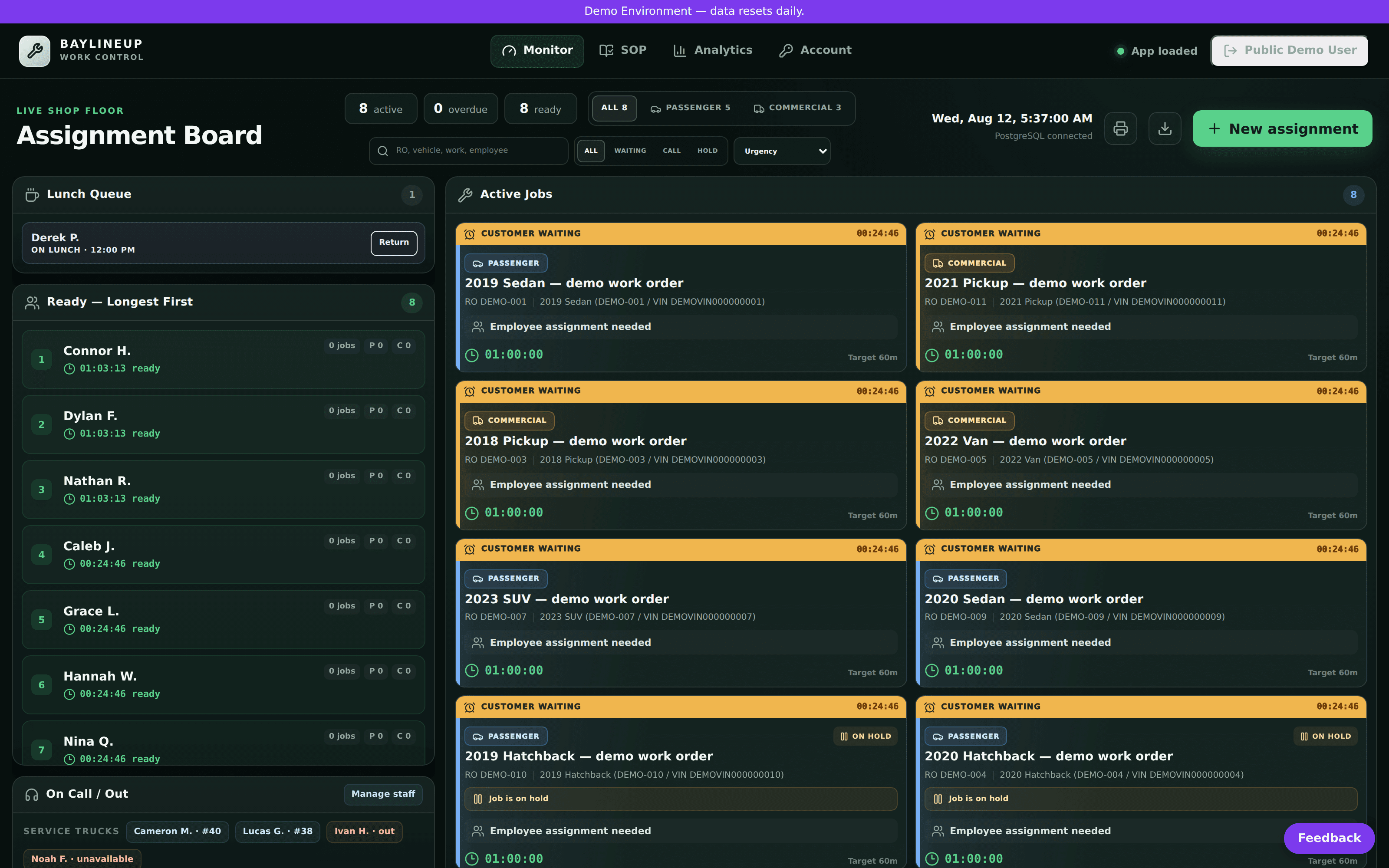
The shop should not depend on somebody remembering to update a whiteboard.
BayLineup turns the moving parts of the day into one shared source of truth, so staff can answer “what is next?” without walking the floor, searching a group chat, or interrupting another person for an update.
A simple workflow the whole shop can understand.
You do not need to rebuild the way your team works. BayLineup makes the existing shop day visible and easier to coordinate.
1. See the day
Open the board and immediately see active work, ready technicians, bay status, and work that needs attention.
2. Assign the next job
Move work to the right technician with the context needed to make a good assignment without extra back-and-forth.
3. Keep the history
As work moves through the shop, BayLineup keeps the operational record so managers can review what actually happened.
One board, the whole shop's workflow.
Assign passenger and commercial work, track lunch and coverage, and see who's ready, active, or unavailable — updated in real time as the day moves.
Assignment board
Drag work onto a technician and see the job, zone, quantity, and state at a glance.
Technician status
Ready, active, on lunch, out, or unavailable — with permission-aware job recommendations.
Operational history
Assignments and completions are saved to a real database, so shop analytics reflect what actually happened.
Trust should be verifiable, not implied.
Review our security and trust approach, read the Privacy Policy, check live system status, and see which integrations are actually available today. We do not advertise certifications or integrations we have not formally verified.
Security controls
Secure sessions, permission-aware access, tenant-scoped workflows, signed webhooks, rate limits, and demo isolation are part of the current platform.
Operational transparency
A public status page and explicit integration-status page make it easier to verify what is healthy and what is actually supported.
Human support
Security, onboarding, and operational questions can be reviewed with a real person instead of being hidden behind an automated signup flow.
Common questions from shop owners
See it running before you talk to anyone.
The free demo is isolated and seeded with fictional shop data. It resets daily, so you can explore the board without risking real records.
Want to see how it fits your shop?
Send a question, get started, or book a walkthrough. We can focus the conversation on your actual workflow instead of a generic sales deck.
A note from the team
No testimonials here yet — on purpose.
We're still early and working directly with our first shops, and we don't publish quotes we haven't earned. Every testimonial on this page will be a real, named shop that chose to share one. Until then, judge the product the honest way: open the free demo (fictional data, no signup) or check live system status.